Open the live demo
Runs in your browser — nothing to install.
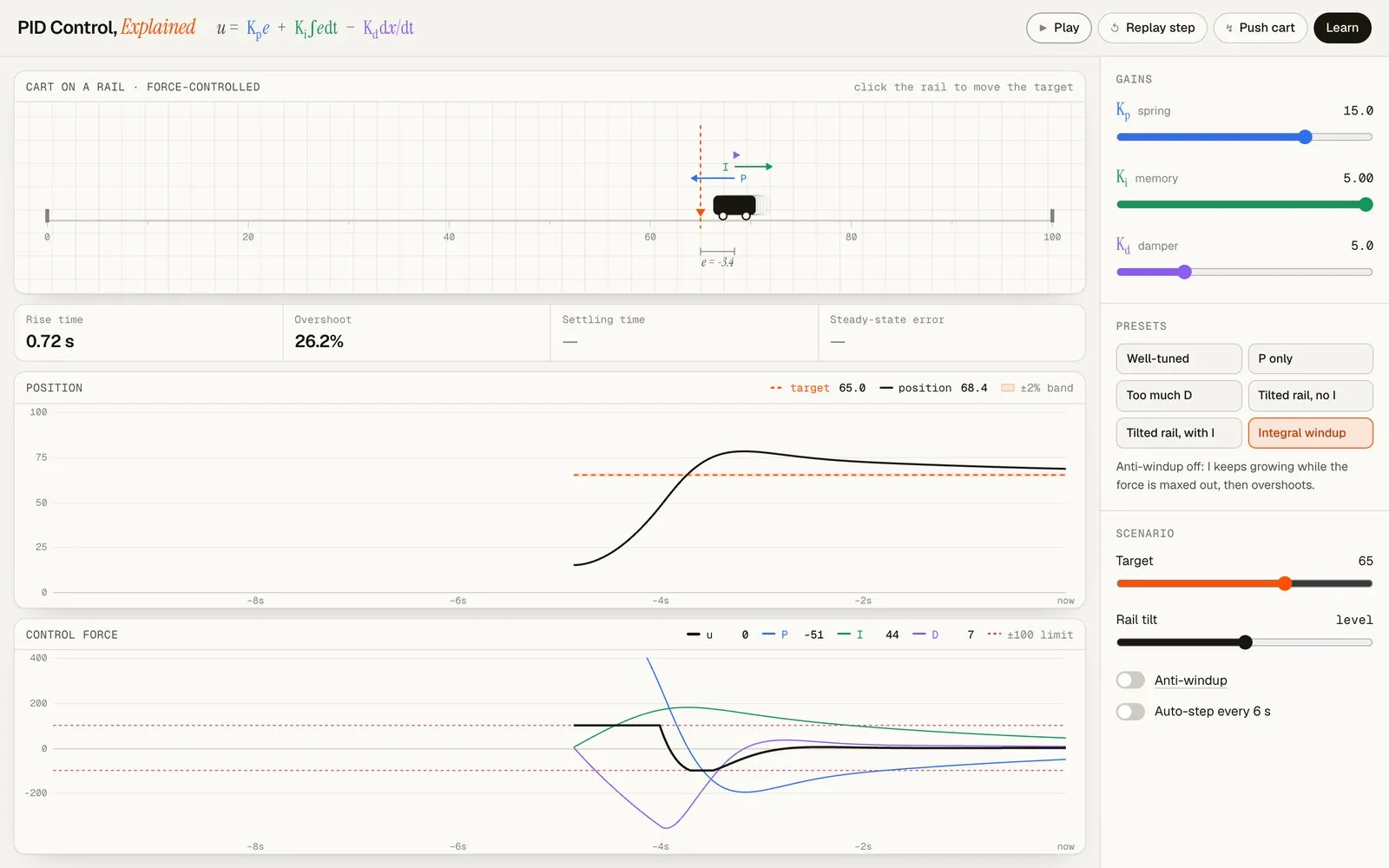
An interactive explanation of PID control, built to give intuition rather than equations alone. You tune the gains on a simulated cart and see what each term is doing — as force arrows on the cart, in live plots of position and control force, and in step-response metrics.
The system
A cart slides along a rail, pushed by a single force limited to ±100. It obeys Newton’s second law with viscous friction, and tilting the rail adds a constant force along it. The controller runs at a fixed 100 Hz, independent of the screen’s refresh rate.
What you can do
- Tune the gains and watch the P, I, and D terms, and the net force, change live.
- Compare presets that differ in one thing: P only versus well-tuned; a tilted rail with and without I; integral windup with anti-windup off and on.
- Poke it: push the cart, click the rail to move the target, or let auto-step alternate setpoints.
- Read the metrics: rise time, overshoot, settling time, and steady-state error, measured the standard way.
- Learn the concepts: every term and metric opens an explanation, from the basics to windup, derivative kick, and tuning methods.